Optima D34 Yellow-Top Battery Installation
October 30, 2005
Written by: E. Long
Discuss this article in this forum thread
Introduction
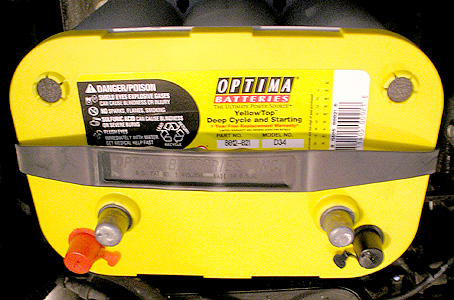
This article shows you how to replace the OEM Ford batteries with Optima D34 series Yellow-Top batteries. This "how to" article was performed on a 2000 Ford Excursion with a 7.3L Powerstroke. The concept outlined in this article may also be applied to other vehicles, too.
The Ford Excursion and SuperDuty will use the Optima D34 series Yellow-Top battery. There are also hybrid series where Optima offers top and side mount posts. You will only need the D34 top-post series for your Excursion or SuperDuty.
I opted for the Yellow-Top deep-cycle batteries because I have an aftermarket stereo. I've run my OEM batteries down multiple times just having the stereo play while working in the yard. The Optima Yellow-Tops are specifically designed for this type of extended use without losing significant charge.
Goal
The goal of this install is to show how to replace the dual OEM batteries with Optima's deep-cycle, D34 Yellow-Top batteries.
Required Tools:
(1) 13mm wrench
(1) 5/16" socket
Purchase tools online from MotorHeadTools.com with your SuperMotors subscriber discount!
Products needed:
(2) Optima D34 Yellow-Top Batteries
(2) Optima battery retainer kits
Time Requirements
20-30 minutes
Difficulty
1 out of 10 (1 being easiest, 10 being hardest)
Where to Buy
I found the Optimas available on Ebay. I would recommend searching Ebay for the best deal on these batteries. Where most retailers were selling them for $180+, I found them for $129/ea on Ebay.
| Step 1: Remove passenger side battery | |
|
|
| Step 2: Install Optima D34 Yellow-Top Battery | |
|
|
| Step 3: Remove driver side battery | |
|
|
| Conclusion | |
|
My battery light had started going on after 155,000 miles and 5 years on my OEM batteries. The new Optimas certainly made a difference when starting and I can now confidently listen to football games on Sundays when working outside and not have to worry about draining the batteries! |
|
| Additional Questions or Comments? | |
|
Do you have additional questions or comments about this install article? Please discuss them in this forum thread. HINT: Click the "printable page" button below to view this article in its entirety with higher-resolution photos. |
Back to the installs page.